アプリ詳細

カスタマーレビュー★
★☆☆☆☆
没有用我只是想把照片简简单单的拼在一起,不要什么预设的相框比例来裁切我的照片。就是这么简单的需求,做不到。
ZheDisco : 2022/01/30
★☆☆☆☆
iOS14.2で動作不能iPhone SE2、iOS14.2で写真の読み込みができません。対応されることを願っております。
ふなやん : 2020/12/01
★☆☆☆☆
保存できなくなった保存しようとすると落ちる。バージョンアップもされないし、長年使ってきたのに残念。
Pentagonjp : 2020/03/24
★☆☆☆☆
…以前は使いやすかったのに…だんだん使いにくくなってきた…戻して欲しい…(´・_・`)
Cassis_3 : 2013/02/06
★☆☆☆☆
使いにくくなった…バージョンアップ後のインターフェイス変え過ぎ!使いにくいったらありゃしない!操作性が下がったように思います…不親切だと感じました。とても好きなアプリだったのに残念。
oyustim : 2013/01/08
★☆☆☆☆
以前みたいに…全部が英語表記なので、翻訳出来ないから、使い方よくわかってないだけかも知れませんが、事前に撮った写真を合成出来るように戻して欲しいです。Facebook使ってないのでFacebookがないと活用出来ないなら持っていても、これから使う事はないかも知れません。最近のアプリはすぐに連携させますけど、このアプリに関しては以前の方がまだ使いどころがあって便利でしたが、今のバージョンでは使い道にすらなりません。
太郎1341 : 2012/12/27
★☆☆☆☆
いいのですが。。とても使いやすくていいアプリなのですが。。やっと作り上げた作品を「よし!」と思って、高画質の方で保存しようとしたらプツっと落ちました。もちろんその写真は保存されておらず、アプリを立ち上げ直してもまた最初から。。とても悲しい気持ちになりました(´Д` )
まつおゆうた : 2012/07/22
★☆☆☆☆
入替、サイズ、後から変更が効かない拡張キットも購入したが、よくなかった。全くの期待外れだった。写真をまとめて選択・インポート出来ない。後から写真の場所の入れ替えが出来ない。作業スペースを拡大出来ず編集しづらい。アプリではフレームマジックが良く出来ている。よく勉強して欲しい。
susususususususususu : 2012/03/07
★☆☆☆☆
なにこれ壁紙サイズに出来ん。
intokyosity : 2011/12/18
★☆☆☆☆
フレームに合わせられない全体の大きさをフレームに合わせられない。縮小して合わせて欲しい。
キルアdeゴン : 2011/07/18
アプリ概要
スクリーンショット


説明
Diptic, a former App Store App of the Week, helps you create and share beautiful photo and video collages. See for yourself why millions of people have downloaded this app!
"A simple, elegant way to use pictures to tell your story." – Macworld
DIPTIC 101
• Create collages with photos and videos
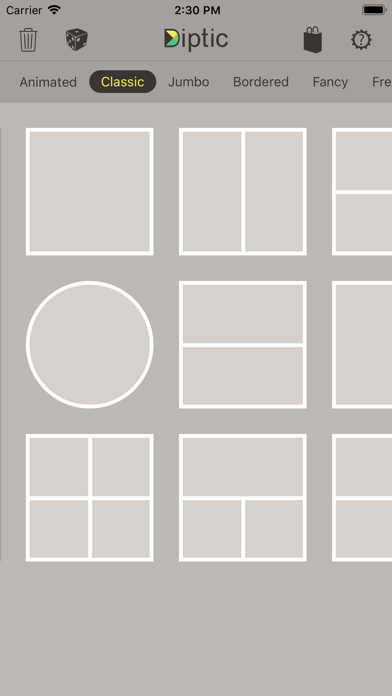
• Super Customizable — Tons of layouts to choose from plus tons of ways to enhance each one. Save your own customized layouts for re-use
• Add text captions, filters, colored borders, textured borders & more
LAYOUTS AND BORDERS
• Choose from 194+ layouts (additional layouts are available as in-app purchases)
• Combine up to nine photos and/or videos in each layout
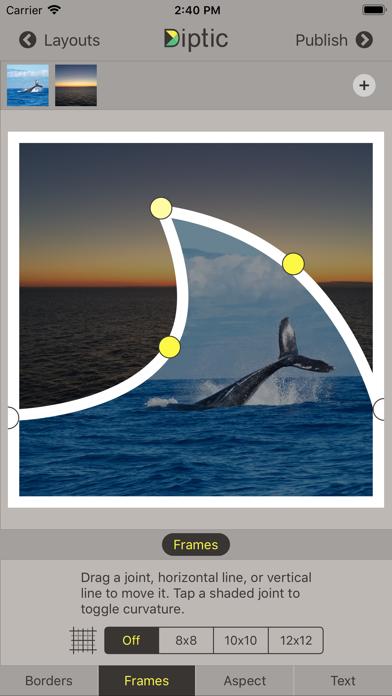
• Customize your layouts to better fit your video or images by sliding interior frame lines or moving joints along the line
• Create rectangular Diptics (great for printing) with Expandable Layouts (in-app purchase)
• Round the inner and outer borders, as well as modify thickness and color, and apply textures to videos and images
IMAGE ADJUSTMENTS
• Choose from 14 filters, as well as adjust brightness, contrast, hue and color saturation
• Pan, rotate, mirror, flip, and zoom individual photos
TEXT CAPTIONS
• Personalize your Diptic photo and video creations with a text caption
• Adjust the font, style, color and size of the text
VIDEO ADJUSTMENTS
• Add music to any video collage and adjust audio start and stop time
• Pick any song from your Music library
• Customize video start and stop time
IMPORT/EXPORT OPTIONS
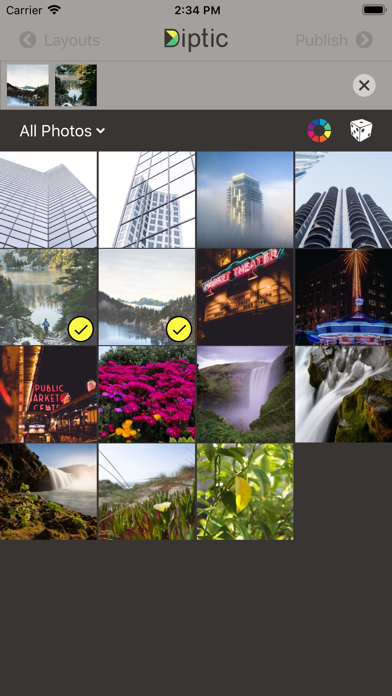
• Create Diptics with photos or videos from your library, Instagram, Dropbox, Facebook or Flickr, or take a photo on the spot with the camera
• Save Diptics for safe keeping or share them with friends. You can send via email, or share by uploading directly to Instagram, Facebook, Twitter, Tumblr or any app that accepts JPGs and/or video files
• High-resolution export for pixel-perfect images
• Import multiple photos and videos at once and swap media between frames
• Add music from your music library to any of your videos
Let’s connect!
Twitter: @dipticapp
Instagram: @dipticapp
Facebook: facebook.com/dipticapp
Flickr: flickr.com/groups/diptic
Please reach out to us at support@dipticapp.com if you have any suggestions for the new video features or anything else you’d like to see... we’d love to hear from you!
"A simple, elegant way to use pictures to tell your story." – Macworld
DIPTIC 101
• Create collages with photos and videos
• Super Customizable — Tons of layouts to choose from plus tons of ways to enhance each one. Save your own customized layouts for re-use
• Add text captions, filters, colored borders, textured borders & more
LAYOUTS AND BORDERS
• Choose from 194+ layouts (additional layouts are available as in-app purchases)
• Combine up to nine photos and/or videos in each layout
• Customize your layouts to better fit your video or images by sliding interior frame lines or moving joints along the line
• Create rectangular Diptics (great for printing) with Expandable Layouts (in-app purchase)
• Round the inner and outer borders, as well as modify thickness and color, and apply textures to videos and images
IMAGE ADJUSTMENTS
• Choose from 14 filters, as well as adjust brightness, contrast, hue and color saturation
• Pan, rotate, mirror, flip, and zoom individual photos
TEXT CAPTIONS
• Personalize your Diptic photo and video creations with a text caption
• Adjust the font, style, color and size of the text
VIDEO ADJUSTMENTS
• Add music to any video collage and adjust audio start and stop time
• Pick any song from your Music library
• Customize video start and stop time
IMPORT/EXPORT OPTIONS
• Create Diptics with photos or videos from your library, Instagram, Dropbox, Facebook or Flickr, or take a photo on the spot with the camera
• Save Diptics for safe keeping or share them with friends. You can send via email, or share by uploading directly to Instagram, Facebook, Twitter, Tumblr or any app that accepts JPGs and/or video files
• High-resolution export for pixel-perfect images
• Import multiple photos and videos at once and swap media between frames
• Add music from your music library to any of your videos
Let’s connect!
Twitter: @dipticapp
Instagram: @dipticapp
Facebook: facebook.com/dipticapp
Flickr: flickr.com/groups/diptic
Please reach out to us at support@dipticapp.com if you have any suggestions for the new video features or anything else you’d like to see... we’d love to hear from you!
リリース情報
*NEW* Home Screen Design - easier to browse layouts.
*NEW* Image Picker - photos, videos, and colors now draggable from trays into layouts.
*NEW* Image Management - selecting & using media is both easier and faster.
*NEW* Expandable Layouts now FREE & included for everyone - common aspect ratios are easy to select.
*NEW* Removed all data collection functionality.
various bug fixes and performance enhancements implemented
*NEW* Image Picker - photos, videos, and colors now draggable from trays into layouts.
*NEW* Image Management - selecting & using media is both easier and faster.
*NEW* Expandable Layouts now FREE & included for everyone - common aspect ratios are easy to select.
*NEW* Removed all data collection functionality.
various bug fixes and performance enhancements implemented