アプリ詳細
 | Abound Labs Inc. |
更新日:2026/01/30 09:51
怒り度・不満度・喜び度 評価
レビューに書かれているワードをカウントし、
その割合を元に独自の評価を行っております。
インストール判断の一つとしてご利用ください。
その割合を元に独自の評価を行っております。
インストール判断の一つとしてご利用ください。
怒り : 18%
詐欺,訴える,危険,酷い,最低,最悪,悪徳,ゴミ,金返せ...
詐欺,訴える,危険,酷い,最低,最悪,悪徳,ゴミ,金返せ...
不満 : 64%
広告,バグ,エラー,不具合,落ちる,出来ない,改善,修正して...
広告,バグ,エラー,不具合,落ちる,出来ない,改善,修正して...
喜び : 18%
良い,楽しい,大好き,面白い,便利,使いやすい,満足,最高...
良い,楽しい,大好き,面白い,便利,使いやすい,満足,最高...
カスタマーレビュー★
★☆☆☆☆
ログインできないサインアップしようとすると”既にアカウントがあります“と出てくるくせに、サインインしようとすると“アカウントが確認できません”になってログインできない。おまけにサイトはブラウザで開くとずっとエラーで表示されない。meta scanからアプリの名前が変わって運営も変わったんだろうか全てがダメになっていく
通りすがりのモデラー : 2025/12/06
★★★★★
iPhone17PROMAXに対応してください機種変するたびに毎回対応が遅く使えない期間が発生しています。良いアプリなのでアップデート対応お願いします。
GMT_s : 2025/11/21
★☆☆☆☆
悲しい。。。今後失われてしまうものだったから3Dスキャンをして永久保存しようと思って購入。データ作成後、他にも思い出と記録の為にLiDARを使ったドールハウスを作ってアップロード中にクラッシュ。iPhone16Proを使っていますが、そこからアプリが全く起動しなくなり作成したデータを見ることも、起動することも出来なくなってしまいました。高額な年間プランで入っているのに使い始めて2週間くらいで使えなくなりました。返金して欲しいし、データもどうにか返ってきてほしいし・かなり悲しい気持ちです。
かっか : 2025/02/19
★☆☆☆☆
iPhone16proで使えないカメラはなぜか5倍ズームだし、Lidarもつかえない
あかさなまりらや : 2024/10/19
★☆☆☆☆
最新のiPhoneに対応してない最新のiPhoneで撮影しようとすると最大ズーム状態から動かせないのでなにも撮影することができません。
ぽみぃ : 2023/11/06
★☆☆☆☆
全然ダメiPhone15 proでLiDAR使ったスキャンができません。残念
Atsutsu0815 : 2023/09/29
アプリ概要
| ジャンル | : | 写真/ビデオ > ユーティリティ |
|---|---|---|
| バージョン | : | 3.1.1 |
| サイズ | : | 124.5 MB |
| 現在のバージョン | : | ★★★★☆ 777 件の評価 |
|---|---|---|
| 全てのバージョン | : | ★★★★☆ 777 件の評価 |
スクリーンショット


説明
Capture, edit, and share in 3D with the most intuitive 3D scanning platform for iPhone, iPad, and Web.
From photorealistic objects to entire spaces, Abound brings 3D scanning to your fingertips.
Capture anything, anywhere
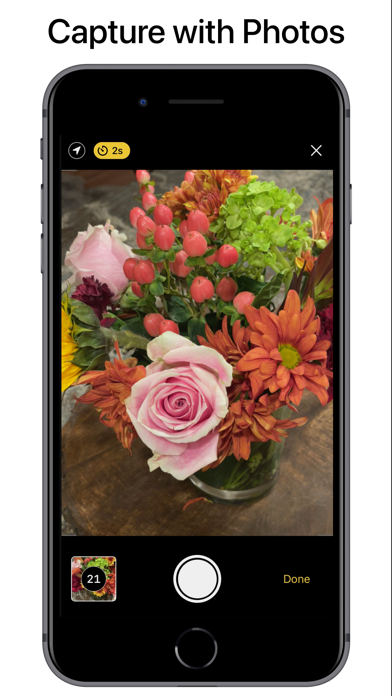
• Turn photos into detailed 3D models utilizing camera zoom, auto-timer, and manual focus options
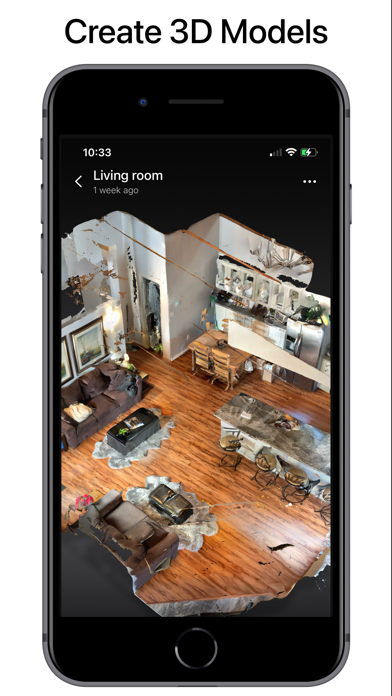
• Effortlessly scan spaces as you walk, with a mini-map, interactive camera views, and real-time raytrace preview
Edit with ease and precision
• Quickly crop, rotate, and clean up scans with intuitive tools
• Take precise, scale-accurate measurements with the measure tool
• Visualize your scans in the real world using augmented reality
Organise and search
• Browse your library in an interactive, zoomable grid
• Search, sort, and filter your scans with ease
• Organize scans into folders
• Explore your geolocated scans with Map View
Export and integrate into your workflow
• Use models in Blender, Unity, Unreal, SketchUp, Maya, and more
• Export meshes (USDZ, OBJ, GLTF, FBX, STL) and point clouds (LAZ, PLY, XYZ)
• Create and export cinematic 4K videos of your scans
Sync across devices
• Create an Abound account to sync your library and back it up to the cloud
• Sign in with Apple or Google for seamless cross-device access
• View and manage your scans from any device, any time, including iPhone, iPad, or at aboundlabs.com
Abound Web
• Embed interactive 3D scans on the web with just one line of HTML
• Upload DSLR photo sets or videos to the web for professional-grade model creation
Share and collaborate instantly
• Send scan links that work in any browser, on any platform
• Post scans publicly or keep them private and share selectively
• Invite others to view, comment, or download
• Share via Messages, email, or third-party apps
Your data, your control
• LiDAR scans are processed on your device—no Internet needed
• Photos are deleted immediately after processing on our servers
• Your scans stay yours until you choose to share
Fast, easy, and accessible
• Full support for Dark Mode and Dynamic Type
• Manage raw scan data with the built-in Storage browser
Go Pro with Abound
• Unlock premium features such as unlimited captures, higher LiDAR resolution, and advanced export formats
Learn more: aboundlabs.com
Terms of Use: aboundlabs.com/terms
Privacy Policy: aboundlabs.com/privacy
Follow us: @aboundlabs on X and Instagram
From photorealistic objects to entire spaces, Abound brings 3D scanning to your fingertips.
Capture anything, anywhere
• Turn photos into detailed 3D models utilizing camera zoom, auto-timer, and manual focus options
• Effortlessly scan spaces as you walk, with a mini-map, interactive camera views, and real-time raytrace preview
Edit with ease and precision
• Quickly crop, rotate, and clean up scans with intuitive tools
• Take precise, scale-accurate measurements with the measure tool
• Visualize your scans in the real world using augmented reality
Organise and search
• Browse your library in an interactive, zoomable grid
• Search, sort, and filter your scans with ease
• Organize scans into folders
• Explore your geolocated scans with Map View
Export and integrate into your workflow
• Use models in Blender, Unity, Unreal, SketchUp, Maya, and more
• Export meshes (USDZ, OBJ, GLTF, FBX, STL) and point clouds (LAZ, PLY, XYZ)
• Create and export cinematic 4K videos of your scans
Sync across devices
• Create an Abound account to sync your library and back it up to the cloud
• Sign in with Apple or Google for seamless cross-device access
• View and manage your scans from any device, any time, including iPhone, iPad, or at aboundlabs.com
Abound Web
• Embed interactive 3D scans on the web with just one line of HTML
• Upload DSLR photo sets or videos to the web for professional-grade model creation
Share and collaborate instantly
• Send scan links that work in any browser, on any platform
• Post scans publicly or keep them private and share selectively
• Invite others to view, comment, or download
• Share via Messages, email, or third-party apps
Your data, your control
• LiDAR scans are processed on your device—no Internet needed
• Photos are deleted immediately after processing on our servers
• Your scans stay yours until you choose to share
Fast, easy, and accessible
• Full support for Dark Mode and Dynamic Type
• Manage raw scan data with the built-in Storage browser
Go Pro with Abound
• Unlock premium features such as unlimited captures, higher LiDAR resolution, and advanced export formats
Learn more: aboundlabs.com
Terms of Use: aboundlabs.com/terms
Privacy Policy: aboundlabs.com/privacy
Follow us: @aboundlabs on X and Instagram
リリース情報
Performance improvements and bug fixes