アプリ詳細

カスタマーレビュー★
アプリ概要
| ジャンル | : | ファイナンス |
|---|---|---|
| バージョン | : | 4.2.7 |
| サイズ | : | 206.3 MB |
| 現在のバージョン | : | ★★★★☆ 36 件の評価 |
|---|---|---|
| 全てのバージョン | : | ★★★★☆ 36 件の評価 |
スクリーンショット





説明
MOZE 4.0 – 10 Years of Excellence, Trusted by Millions
Beautiful Interface × Powerful Features × Ultimate Experience
Turn bookkeeping into pure enjoyment!
Tired of your money disappearing without a trace?
Want to take control of your finances but don’t know where to start?
MOZE helps you effortlessly build bookkeeping habits and regain control over your money!
---
【 What’s New in 4.0 】
iPad Version – Designed for large screens with cross-device synchronization
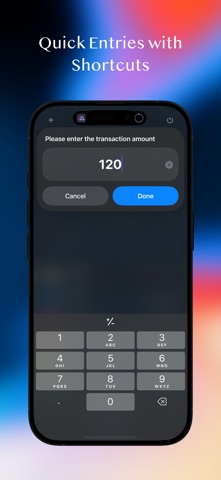
Shortcut Quick Entry – Log a transaction in seconds without opening the app
Enhanced Statistics Reports – Multi-dimensional analysis by account, project, target, and more
Comparison Reports – Cross-period comparisons to track financial trends
Multiple Invoices Linking – Attach several invoices to a single transaction entry
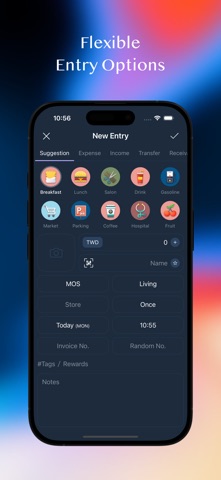
Entry Modes Switch – Context-based quick selection of account and category presets
Full-Screen Calendar View – Monitor daily income and expenses at a glance
Sign in with Apple & Sync – Automatically back up data to MOZE Cloud
Crypto Tracking – Follow the top 100 cryptocurrencies by market cap
30+ Updates and Optimizations – Better UX, smoother performance, more power
---
【 Core Features Overview 】
Powerful Financial Management
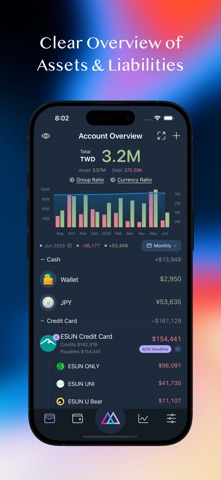
• Multi-account support, cross-currency bookkeeping
• Project grouping, budget planning
• Payables & receivables tracking, interest calculations
Daily Use Scenarios
• Comprehensive support for recurring expenses, installments, refunds, fees, discounts, and more
Credit Card Center
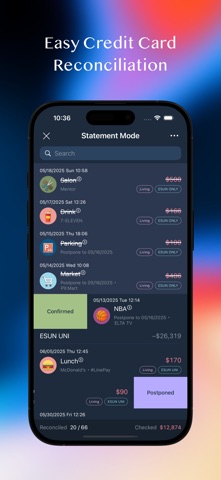
• Advanced features including shared credits, statement mode, billing installments, rewards tracking, auto deposit, balance adjustments
Rich Report Analysis
• Various types of statistical reports
• Comparison tables across different time periods
Taiwan E-Invoice Integration
• Mobile barcode carrier, QR code scanning, automatic lottery checking, invoice linking
Privacy & Security
• ISO-27001 certified
• Cloud encryption and password protection to safeguard your data
Personalization
• Over 100 built-in common categories, fully customizable to personal preferences
• Multiple theme options, downloadable account and color icons to create your unique style
Other Features
• Search, batch processing, CSV import/export, cloud backup / restore
Widget
• Instantly check accounts, budgets, notifications, rewards, and more
Apple Watch
• Quick entry, recent records, credit card payment reminders, transaction reminders, mobile barcode
---
Why Choose MOZE?
• 10 years of continuous development, full-featured and refined
• Trusted by millions of users
• Taiwan-localized design that truly understands your needs
---
Contact & Support
• Facebook Page: https://moze.to/moze_fb
• Facebook Group: https://moze.to/moze_group
• Email: hello@moze.app
• Website: https://moze.app
• Pricing: https://moze.app/pricing
• FAQ: https://faq.moze.app/
• Features: https://doc.moze.app/
Legal
• Privacy Policy: https://moze.to/website_privacy
• Terms of Use: https://moze.to/website_terms
---
Ready to make money management effortless? Download MOZE 4.0 and start your 14-day free trial today!
Beautiful Interface × Powerful Features × Ultimate Experience
Turn bookkeeping into pure enjoyment!
Tired of your money disappearing without a trace?
Want to take control of your finances but don’t know where to start?
MOZE helps you effortlessly build bookkeeping habits and regain control over your money!
---
【 What’s New in 4.0 】
iPad Version – Designed for large screens with cross-device synchronization
Shortcut Quick Entry – Log a transaction in seconds without opening the app
Enhanced Statistics Reports – Multi-dimensional analysis by account, project, target, and more
Comparison Reports – Cross-period comparisons to track financial trends
Multiple Invoices Linking – Attach several invoices to a single transaction entry
Entry Modes Switch – Context-based quick selection of account and category presets
Full-Screen Calendar View – Monitor daily income and expenses at a glance
Sign in with Apple & Sync – Automatically back up data to MOZE Cloud
Crypto Tracking – Follow the top 100 cryptocurrencies by market cap
30+ Updates and Optimizations – Better UX, smoother performance, more power
---
【 Core Features Overview 】
Powerful Financial Management
• Multi-account support, cross-currency bookkeeping
• Project grouping, budget planning
• Payables & receivables tracking, interest calculations
Daily Use Scenarios
• Comprehensive support for recurring expenses, installments, refunds, fees, discounts, and more
Credit Card Center
• Advanced features including shared credits, statement mode, billing installments, rewards tracking, auto deposit, balance adjustments
Rich Report Analysis
• Various types of statistical reports
• Comparison tables across different time periods
Taiwan E-Invoice Integration
• Mobile barcode carrier, QR code scanning, automatic lottery checking, invoice linking
Privacy & Security
• ISO-27001 certified
• Cloud encryption and password protection to safeguard your data
Personalization
• Over 100 built-in common categories, fully customizable to personal preferences
• Multiple theme options, downloadable account and color icons to create your unique style
Other Features
• Search, batch processing, CSV import/export, cloud backup / restore
Widget
• Instantly check accounts, budgets, notifications, rewards, and more
Apple Watch
• Quick entry, recent records, credit card payment reminders, transaction reminders, mobile barcode
---
Why Choose MOZE?
• 10 years of continuous development, full-featured and refined
• Trusted by millions of users
• Taiwan-localized design that truly understands your needs
---
Contact & Support
• Facebook Page: https://moze.to/moze_fb
• Facebook Group: https://moze.to/moze_group
• Email: hello@moze.app
• Website: https://moze.app
• Pricing: https://moze.app/pricing
• FAQ: https://faq.moze.app/
• Features: https://doc.moze.app/
Legal
• Privacy Policy: https://moze.to/website_privacy
• Terms of Use: https://moze.to/website_terms
---
Ready to make money management effortless? Download MOZE 4.0 and start your 14-day free trial today!
リリース情報
NEW
- Project budget category list adds Fee, Interest Expense, Receivables and Payables
FIX
- Moving a record's date across a balance adjustment didn't recalculate the adjustment difference
- "No Store" and "No Tag" options disappeared from report conditions
- Interest calculation period could be wrong after adjusting an installment's payment date
- Editing a future recurring event set to "Move to Previous" on non-business days could produce two periods on the same day
- On iPad, selecting a template from the sidebar left the record name stuck on the typed keyword
- MOZE Cloud backup history only showed a single entry after signing in again
- Other minor issues and improve user experience
IMPROVE
- Editing future installment periods now shows the updated per-period amount instantly
- Deleting a single record from a recurring entry now shifts the following periods automatically, without asking
- Receiving multiple payments at once didn't reuse the account from last time
- Credit card statement notifications hidden in Notifications can be restored from the menu at the top right of the account detail
- Foreign-currency detection in image entry
- The sub-account menu for combined accounts now scrolls when there are many items
- History Overview moved to the "More" menu on the account page
- Date and time fields on the iPad entry page now use the compact number keypad
- Batch Update now supports the project setting for split-category records
- Project budget category list adds Fee, Interest Expense, Receivables and Payables
FIX
- Moving a record's date across a balance adjustment didn't recalculate the adjustment difference
- "No Store" and "No Tag" options disappeared from report conditions
- Interest calculation period could be wrong after adjusting an installment's payment date
- Editing a future recurring event set to "Move to Previous" on non-business days could produce two periods on the same day
- On iPad, selecting a template from the sidebar left the record name stuck on the typed keyword
- MOZE Cloud backup history only showed a single entry after signing in again
- Other minor issues and improve user experience
IMPROVE
- Editing future installment periods now shows the updated per-period amount instantly
- Deleting a single record from a recurring entry now shifts the following periods automatically, without asking
- Receiving multiple payments at once didn't reuse the account from last time
- Credit card statement notifications hidden in Notifications can be restored from the menu at the top right of the account detail
- Foreign-currency detection in image entry
- The sub-account menu for combined accounts now scrolls when there are many items
- History Overview moved to the "More" menu on the account page
- Date and time fields on the iPad entry page now use the compact number keypad
- Batch Update now supports the project setting for split-category records